
Main image and detail shots of the LRS-362.
LRS-362 car/SUV 3D 360 panoramic surveillance system (4-channel camera/3D surround/built-in 16G recording)
Send the vehicle type, quantity and market — we reply with a configuration and price within 24 hours.
LRS-362 datasheet — full specification, ordering notes and installation guidance as a PDF (2.2 MB). Open it here or ask us to email it with your quotation.
Key features
- 3D Surround View Monitoring System: 4-way cameras (front/rear/left/right) are combined into a 3D surround screen
- Built-in 16G storage, can record continuously for about 16 hours; the video can be browsed, played back, deleted, or exported to a USB flash drive
- The 3D perspective can be rotated, the 2D top view can be switched, and the view can be custom
- Supports two options: factory screen/retrofitted screen, universal for cars, SUVs, and commercial vehicles
- Calibration cloth + vehicle parameters (length/width/lens model) calibration, parameters can be imported/exported
- Remote control to manually switch between viewing angles
- Shift forward/reverse to automatically activate the corresponding viewing angle
- Turn on left/right turn signal Automatic activation 360
- Double click the double flash button to activate or exit 360
- When driving at low speed, the radar automatically activates when detecting obstacles 360
- Models with P gear button can also be activated by pressing P
- 16 customizable views, 2D top view optionally displayed on left or right
- 3D mode 4 angles switchable
- The reversing scale line is turned off by default and can be turned on in the menu
- Radar wall display: Display radar prompts on the screen when an obstacle is detected
- Supports importing custom boot logo via USB flash drive
- Built-in 16G storage, continuous recording for about 16 hours
- The recording status is displayed in the upper left corner of the main interface (red light is recording, blue light is not recording)
- View, play and delete recordings by date and time period; built-in recordings can be exported to a USB flash drive
- 3D circle rotation when booting
- Whether to activate 360 when turning the steering wheel (can be switched on or off)
- Display 3D left/right view when steering is activated
- Double flash quick activation (double click)
- Radar detects obstacle and activates 360
- The front and rear viewing angles/left and right viewing angles can be switched to the "adjusted" viewing angle
- Display closing delay: 0s / 15s / 90s / never closed after moving from R to D
- Display delay for double flash activation: 5s / 15s / 30s automatic shutdown
- Camera: front/rear/left/right 4-way; camera cable color definition: front black, right red, left blue, rear yellow
- Host interface: CANH1/CANL1, CANH2/CANL2 (dual CAN), CVBS OUT, VGA (RGBHV), TXD/RXD serial port, ACC input, B+, reverse control high and low output, grounding
- Package: host + 4-way camera + main cable + extension cable + OBD cable + remote control
- Calibration: calibration cloth + input vehicle parameters (vehicle length / vehicle width / lens model) → start calibration; advanced calibration can be used when the ground line is not straight
- Add customer logo (startup screen/interface)
- The knob remote control can also trigger panorama
Ordering notes
Points to confirm before production so the unit arrives ready to fit.
- Confirm the car model (sedan/SUV/commercial vehicle) and whether to retain the factory harness screen (original screen display or additional screen)
- Confirm camera selection (common combinations for catalog records: 6048 + 2053)
- Confirm the standard content: host, 4-channel cameras, main cable, extension cable, OBD cable, number of remote controls
- Confirm whether you need the 24-hour parking monitoring version or the 16G version with memory
- Confirm whether a protocol box is needed (dual CAN protocol box, output data from TX; the transparent car bottom function requires a vehicle speed signal to be used)
- Confirm the purpose and definition of the serial port (the customer asked: How many video output lines and serial port functions are there on the standard main line)
- Confirm the default resolution of the camera (the system default is 720P, you can confirm whether it can be changed to the default 1080P)
- Confirm packaging requirements (whether there is a need for kraft paper packaging) and accessories list (number of power cords)
- Confirm quantity, packaging and printing requirements in advance.
This list covers the main points. The full ordering sheet for this model is available on request.
Installation & usage
Voltage, wiring, sealing and maintenance guidance for the installer.
- Calibration must be done after installation. Failure to calibrate will cause screen misalignment and blind spots
- For calibration, you must choose a flat site, use the matching calibration cloth, and enter the correct vehicle length/width/lens model
- The installation position and angle of the camera are as shown in the drawing, and the left and right cannot be installed reversely (front black/right red/left blue/rear yellow)
- After the calibration is completed, it is recommended to export the calibration parameter backup to facilitate import when repairing or changing the host
- Clean the lens regularly. Mud and water obstruction will affect the splicing and calibration accuracy
- Route the wires away from high-temperature parts and sharp sheet metal edges. Connect the connectors tightly and securely
Specification guides for this kind of product
Written by our engineers for buyers comparing specifications, not slogans.
360° Panoramic vs BSD Radar: Which Blind Spot System Do You Need?
Comparing 360° panoramic systems with camera-based BSD and ultrasonic radar: what each detects, how each fails, and how to combine them on trucks and buses.
DMS and ADAS Explained: Fleet Safety Monitoring That Works
What driver monitoring (DMS) and advanced driver assistance (ADAS) actually detect, how they differ from BSD, and how to deploy them so the data gets used.
Other models in this range

LRS-370 P3 360 panoramic driving safety system for large trucks (4-channel 1080P AHD / 2D+3D panoramic / DC10-33V)
4 channels of 1080P AHD camera input, combined into a 360-degree surround picture, with 2D / 3D viewing angle switchable
View details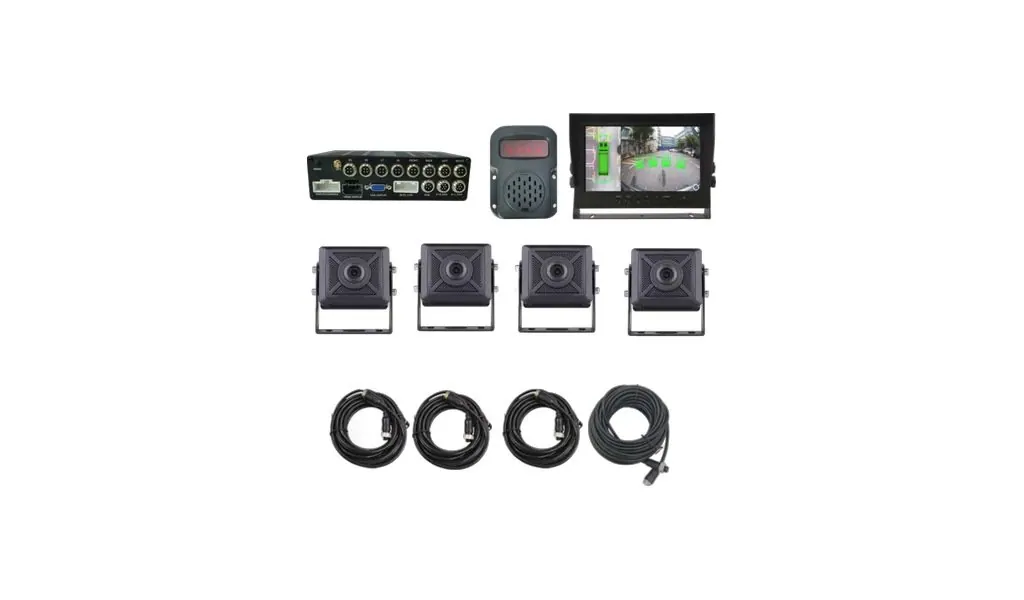
LRS-371AI Cart 360 Panorama + AI Blind Spot + Radar + Sound and Light Alarm System (8-channel AHD /
360-degree surround view + built-in AI vision algorithm, 360-degree blind spot detection for the entire vehicle: able to identify pe…
View details
LRS-372-4G intelligent safety system for large vehicles (4G+GPS+360 panoramic view+DMS/ADAS/BSD+radar+sound
Integrated Beidou Positioning / 4G Video Transmission / CAN Communication / Blind Spot BSD + Lane Change Assist LCA + DMS Fatigue an…
View details
LRS-373 360 panoramic all-in-one machine (NEX-1070A basic version / NEX-1090A-PRO enhanced version / 7-inch screen /
All-in-one machine: screen, 360 host, and AI algorithm are all in one shell, no need to install a separate host
View detailsNeed a quotation for the LRS-362?
Send us the quantity, the vehicle or application, and the destination market. We will confirm the specification and quote within 24 hours.